Accounts and Corporation Tax for UK micro companies, ready to file.
From bank statement to the accounts and Corporation Tax return. Upload your statements and review the categories the software suggests, and it keeps proper double-entry books, works out the tax and prepares the pack for you or your accountant to file. Built first for companies that let property.
Free during early access. Sign in with a six-digit code sent to your email. Made for UK micro companies, first for those that let property. How filing works.
Upload statements
CSV, OFX, QFX or PDF from the company's bank accounts.
Review the suggestions
Approve or change the category suggested for each payment.
Approve the pack
The accounts and Corporation Tax figures, ready for you or your accountant to file.
Watch a first year, start to finish
A short video of one example company, from an empty account to an approved filing pack. It has a voice, and every name and figure in it is example data.
The same steps in pictures, with the words- Entries are permanent
- A mistake is put right with a reversing entry, and every change is logged.
- Every row is explained
- A row that cannot be read is reported, so every line of a statement is accounted for.
- Approved packs are locked
- What you file is exactly what you approved.
- Sign in with a code
- An account takes an email address and a six-digit code. It is free during early access.
Six filings, one set of books
Annual accounts and Corporation Tax are the core. The rest follow from the same books.
Annual accounts
Micro-entity accounts built from your books, tagged and ready for you to file.
To Companies House9 months after your year end
Corporation Tax return
Your CT600, with the accounts and the computations, ready for you to file.
To HMRCReturn 12 months after the period ends
VAT returns
What a VAT-registered company keeps and sends, and when.
To HMRC1 month and 7 days after each periodComing
Self Assessment
What a director or landlord sends, and when.
To HMRC31 January after the tax yearComing
Confirmation statement
The date it is due, and what to check before you file it.
To Companies House14 days after the review periodComing
Close a company
What closing a solvent company involves, in order.
To Companies HouseOnce, when the company stopsComing
See all the products.
Made for micro companies, first for property
UK private limited companies that are micro-entities. The books, the categories and the tax rules are built first for companies whose business is letting property, whether buy-to-let flats and houses or houses in multiple occupation.
Read about buy-to-let company accounts and HMO company bookkeeping, see every product, or read how it works.
From bank statement to filing pack
Bring in your statements
Upload CSV, OFX or PDF statements from the company's bank accounts. Every row is checked and explained. A row that cannot be read is reported, never quietly dropped.
Review the suggestions
Your own rules, what the company did before and an AI model suggest a category for each payment. Anything it is unsure of waits in a review queue for you to decide.
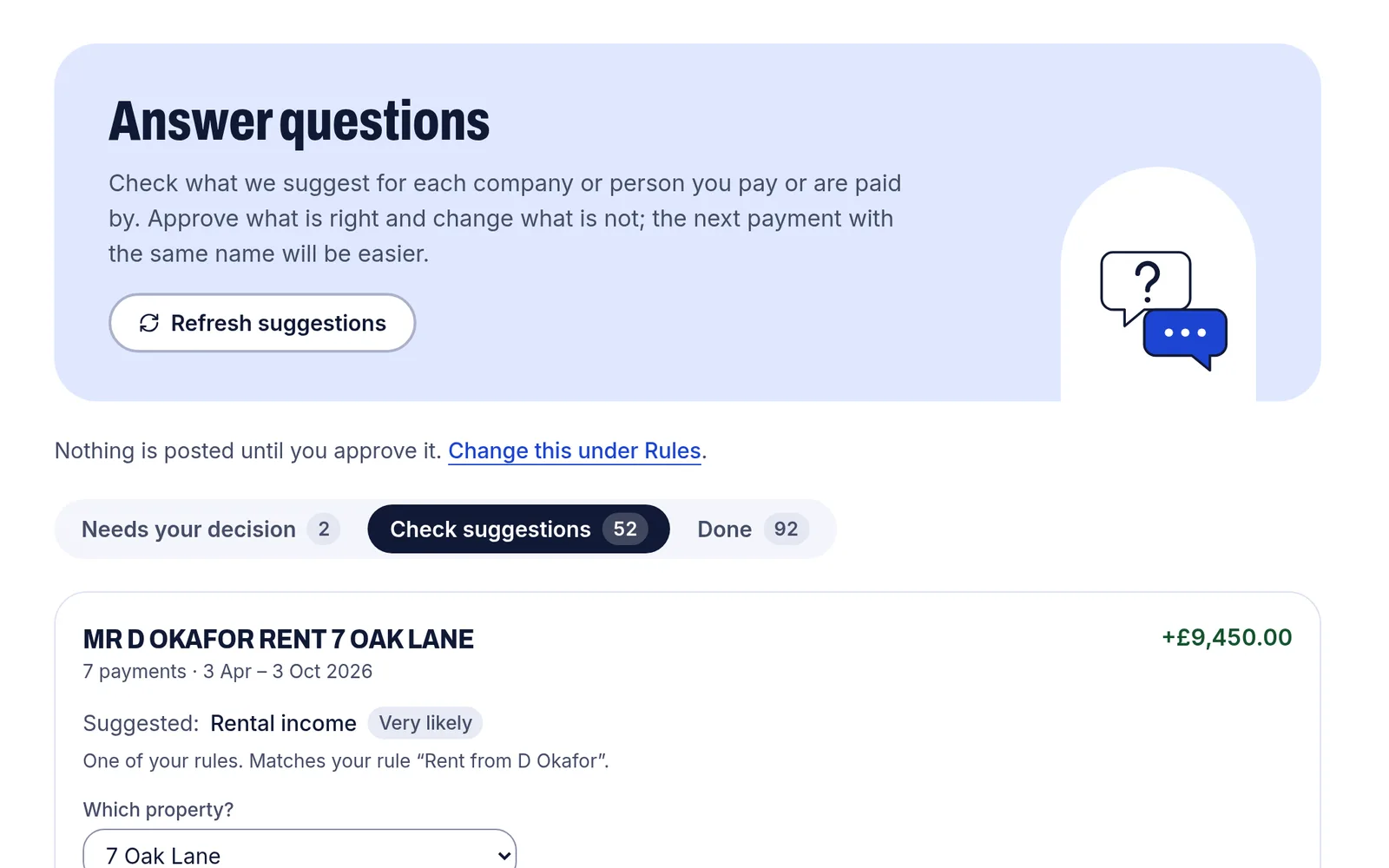
The review queue. Each payee has a suggestion and the reason for it, and nothing is posted until you approve it. Example data. Check the books
Entries are double-entry and permanent. A mistake is put right with a reversing entry, and every change is logged. Reports show the trial balance, profit and loss, balance sheet and the result for each property.
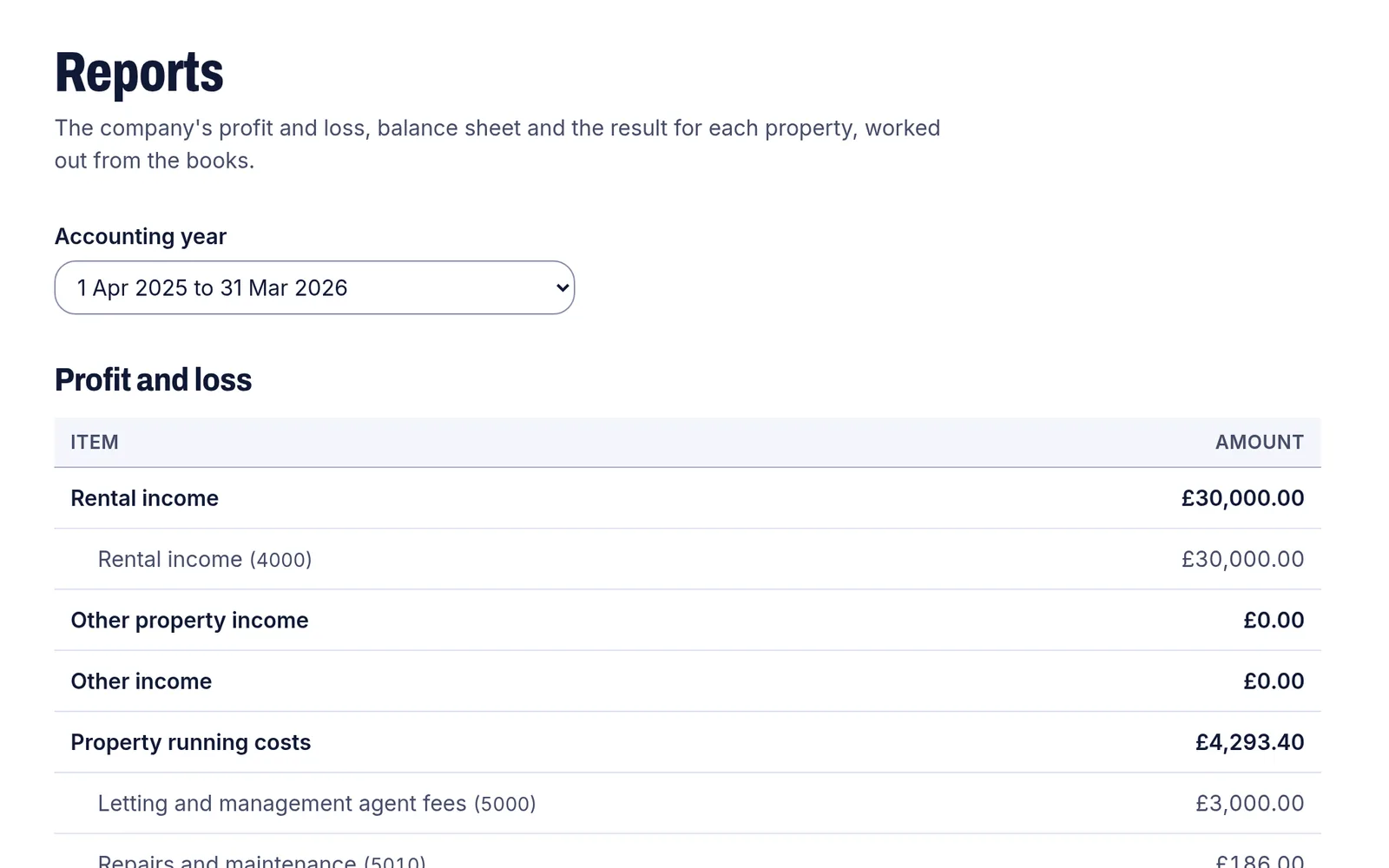
The profit and loss account, worked out from the books. Example data. See the tax
Corporation Tax is worked out from the books at the rates in force for the period, and set out as the boxes of the company tax return (CT600).
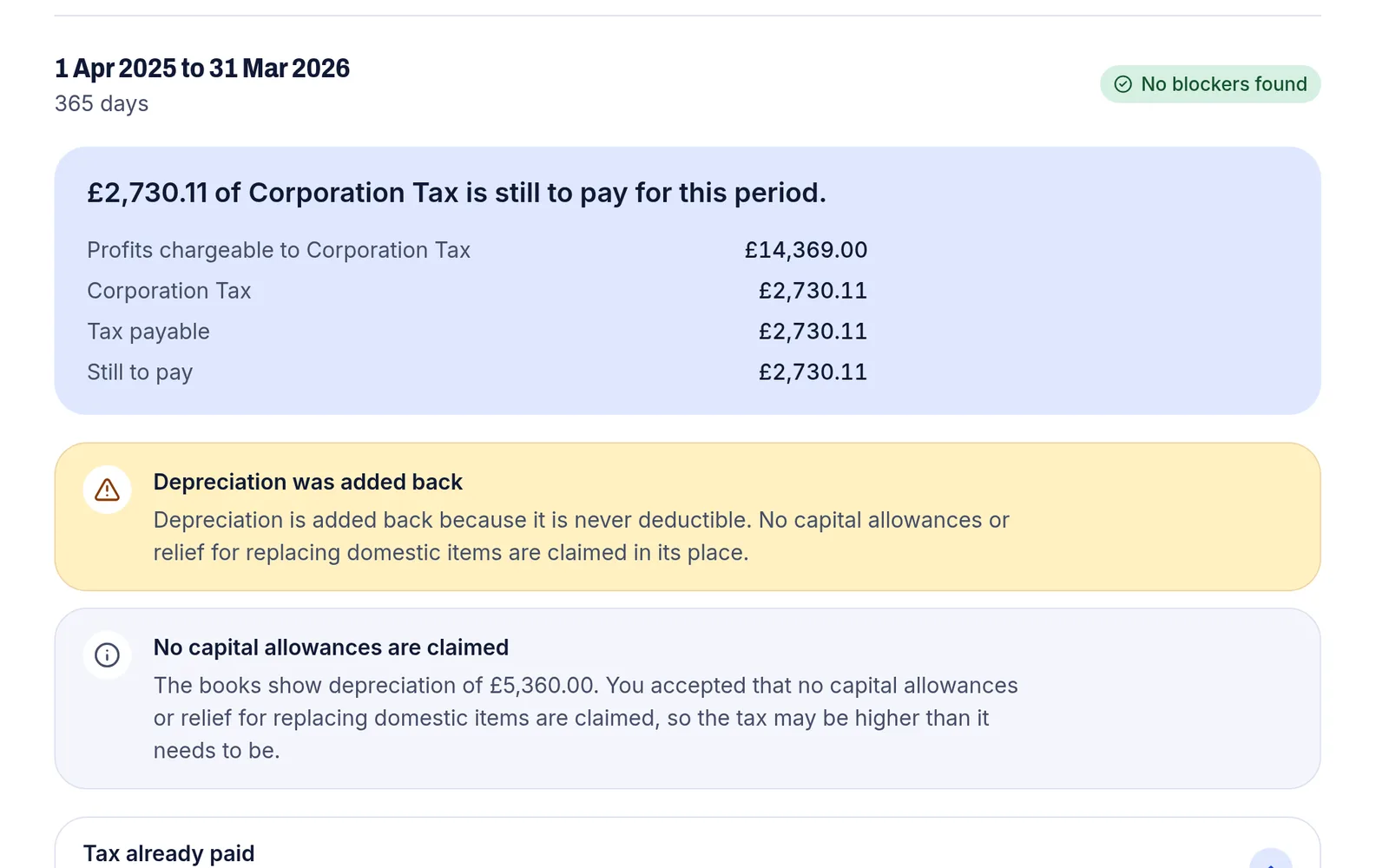
Corporation Tax for one period, worked out from the books and set out as the boxes of the CT600. Example data. Approve a filing pack
The accounts and the tax figures are put together as a pack. An owner approves it, and its files are then locked: what you file is exactly what you approved.
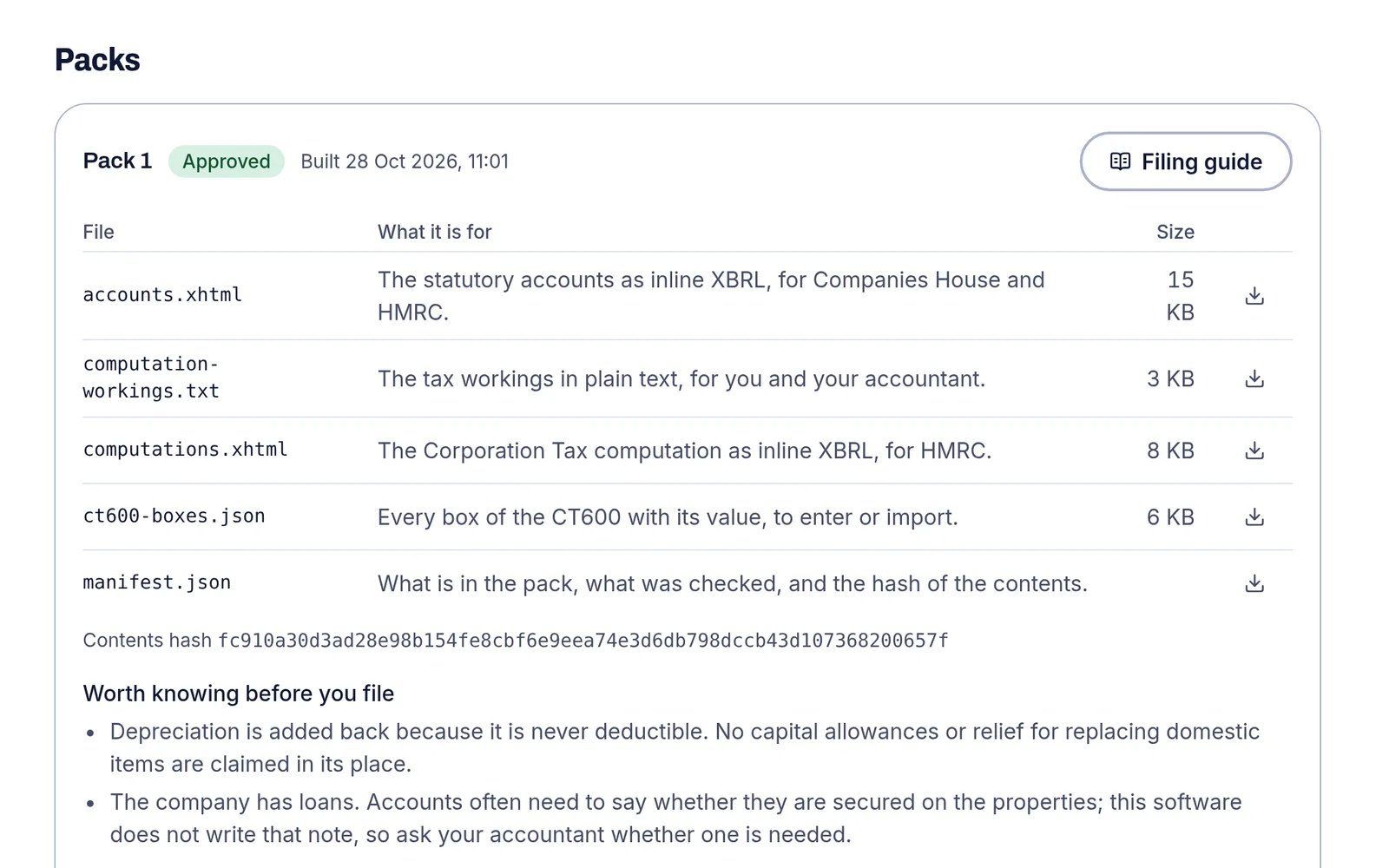
An approved filing pack and the files in it. Example data. Keep to your deadlines
Deadlines for the accounts, the tax payment, the return and the confirmation statement are worked out and tracked. Each approved pack comes with a step-by-step guide and a bundle of files for filing the accounts and the return, with commercial filing software or through your accountant.
Try it with one bank statement
Upload a statement and see the books, the reports and the tax figures it makes. It is free during early access.
What you get
Books you can follow.
Double-entry books where every entry is permanent: a mistake is put right with a reversing entry, and every change is logged.
Tax from fixed rules.
Corporation Tax is worked out from your reviewed books at the rates in force for the period. The AI suggests categories, and the rules do the arithmetic.
A pack you approve.
The accounts, the CT600 values and the workings are put together, and an owner approves them. Its files are then locked, so what is filed is what you approved.
A guide to file it.
Each approved pack comes with a step-by-step guide and a bundle of files, to use with commercial filing software or to hand to your accountant.
Made for micro companies.
Micro-entity (FRS 105) accounts, with the books, the categories and the tax rules built first for companies that let property.
A place for your accountant.
Add them with the accountant role and they can look at everything beside you.
Questions people ask first
How do I file my accounts and tax return?
An owner approves the pack: the accounts, the CT600 values and the workings. Each approved pack comes with a step-by-step guide and a bundle of files, and you, or your accountant, file the accounts and the return with commercial filing software.
The filing by hand page shows each step and the official page behind it.
What does the AI do?
It suggests a category for a payment, and anything it is unsure about goes to a review queue for you. Tax and every other figure come from fixed rules. Transaction descriptions are sent to the model to suggest the category.
How are the tax figures worked out?
From your reviewed books, by fixed rules, and checked against HMRC's published validation rules. They are a working draft until you, or your accountant, have checked them, so check them before you file.
What does it cost?
Nothing during early access. A price will be set, and published, before billing opens.
Try it on your own books
Free during early access. Make an account with your email address and a six-digit code, then upload your first statement.